[PHP4WP#1] PHP for WordPress – Linkedin Course
Notes:
- Introduction
- Other course
- WordPress 5 Essential Training
- Become a web developer (Learning Path)
- Other course
- PHP BASICS
- PHP Hypertext Programming language.
- Key areas
- Input and output
- Variables
- Controlling flow in your code
- Arrays
- Generalizing with functions
- Code block
<?php
   // PHP code lines go here
?>
<?php echo "Hello World"; ?> //one statemends ends with semicolon- …
- PHP coding conventions
- All PHP files must end in .php
- Statements (or commands) in PHP end with a semicolon (;)
- If you want to include comments, which are nonfunctional notes, you can do so in two ways
- PHP coding conventions
//Single-line comments are two forward slashes.

/* Multiline, or block comments, start with a
forward slash and an asterisk. They end with an asterisk
and forward slash. */- …
- Variables
- A way to store information in order to reference it later
- Variables
<?php
$age = 34;
echo $age;

$age = 35;

$double_age = $age * 2;
echo $double_age;//Outputs 70
?>
<?php
$username= get_logged_in_user();
echo "Hello $username!";
?>Variable types
- PHP a weak-typed language, where PHP takes care of what kind of data we store in a variable.
- Types of variable
- Integers, whole numbers
- Floats, numbers with decimals
- Characters, single letters, numbers, or symbols
- Strings
- Booleans
- Arrays
- 1 vs ‘v’
- You can do calculation with 1 but not ‘1’
STRINGS IN PHP
- Double Quotes
- Strings in double quotes will be processed by PHP before they’re outputted.
<?php
  $age = 34;
  echo "Joe is $age years old";//Joe is 34 years old
  echo 'Joe is $age years old'; //Joe is $age years old
  echo 'Joe is '.$age.' years old.'; //Joe is 34 years old

?>
In below example not the single quote inside double quote and escaping characters.
<?php
  $age = 34;
  echo "Joe's nickname in high school was \"Joey colzone\"";//Joe's nickname in high school was "Joey colzone"


?>- Escaping characters (only used with double quotes or sometimes with single quote)
- \n for a new line
- \\ for a backslash
- \$ for a dollar sign
- \t for a tab
<?php
  $age = 34;
  echo "Joe is $age years old\n";//Joe is 34 years old
  echo "This is the second line\n";
  echo 'Joe\'s nickname is J';//Joe's nickname is J

?>
USING ARRAYS
<?php
  $colors =array('red','green','blue','yellow');
  print_r( $colors);
?>
output of above code
Array
(
    [0] => red
    [1] => green
    [2] => blue
    [3] => yellow
)
printing out single element of arrays
<?php
  $colors =array('red','green','blue','yellow');
  echo $colors[1];//green
?>
We can also use string indexes
<?php
  $colors =array('red','green','blue','yellow');

  $joe = array(
    'name' => 'Joe Casabona',
    'page' => 34,
    'job'  => 'Freelancer',
  );

  print_r($joe);
  echo $joe['job'];//Freelancer
?>
output
Array
(
    [name] => Joe Casabona
    [page] => 34
    [job] => Freelancer
)
Freelancer
Multi-dimensional arrays
<?php
  $colors =array('red','green','blue','yellow');

  $family_members = array(
    'papa' => array(
      'name' => 'Rakesh Mehta',
      'age' => 55,
    ),
    'mom' => array(
      'name' => 'Seema Mehta',
      'age' => 49,
    ),
    'me' => array(
      'name' => 'Dikshant Mehta',
      'age' => 25,
    ),
    'sis' => array(
      'name' => 'Garima Mehta',
      'age' => 23,
    ),
  );

  print_r( $family_members);
  echo $family_members['papa']['name']."\n";//Rakesh Mehta
  print_r( $family_members['papa']); // output array of papa
?>
output
Array
(
    [papa] => Array
        (
            [name] => Rakesh Mehta
            [age] => 55
        )

    [mom] => Array
        (
            [name] => Seema Mehta
            [age] => 49
        )

    [me] => Array
        (
            [name] => Dikshant Mehta
            [age] => 25
        )

    [sis] => Array
        (
            [name] => Garima Mehta
            [age] => 23
        )

)
Rakesh Mehta
Array
(
    [name] => Rakesh Mehta
    [age] => 55
)
Arithmetic operators and math in PHP
Arithmetic operators
- Addition +
- Subtraction –
- Multiplication with *
- Division with /
- Get the remainder with %
PHP is smart to evaluate the variable or the literal operation.
echo 1+1; //2

echo 14 % 8;//will print out 6
PEMDAS – order of mathematical operations
- Parentheses
- Exponents
- Multiplication and Division
- Addition and Subtraction
echo 3**2;//Print out exponent result 9Challenge: Perform a mathematic operation and store it
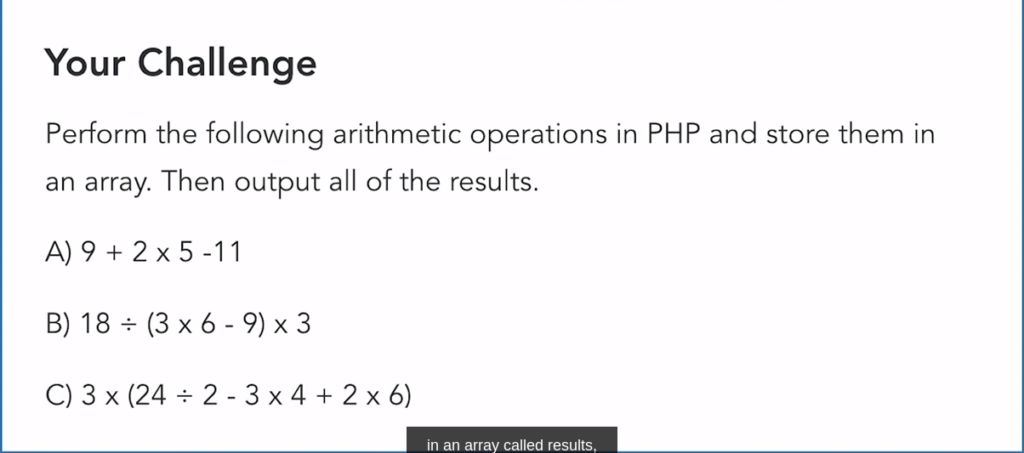
<?php
 $results = array();
 $results[] = 9 + 2 *5 - 11;
 $results[] = 18 / (3 * 6 - 9) * 3;
 $results[] = 3 * (24 / 2 - 3 * 4 + 2 * 6);

 print_r( $results );

?>
output
Array
(
    [0] => 8
    [1] => 6
    [2] => 36
)
We use array for coding convenience and to speed up operations.