WordPress: Workflows
Introduction
WordPress workflows
- Creating a WordPress site
- Building a child theme
- Develping a client site
- Advanced workflow tools
our workflows
- Setup tasks (If you’ve used WordPress before, but want to set up your own site)
- Your content
- Buy hosting
- buy a domain
- Install WordPress
- Build your child theme
- Developing a client site
- Defining roles and responsibilities
- Who is doing content vs who is doing technical implementing
- Usually, the client handles the content
- You will likely do technical implementing
- Using git for version controls.
- Defining roles and responsibilities
- advanced Workflows (if you have experience with client sites and you want to know what’s next)
- Grunt and other build tools
- Automated testing
- React and Gutenberg
- Static site generators
Building your first WordPress site
Your project chcklist
- Setup tasks
- Your Content
- Buy hosting
- Buy a domain
- Install WordPress
- Building
- Disable Search engines
- OptionalL Install a coming soon plugin
- Choose your theme
- Choose your plugins
- Create your pages and first posts
- Make your customizations
- Launching
- Test everything
- Enable Search engines
- Turn off the Coming soon page (if needed)
- Launch
Tips for choosing a domain
- Domain primer ( i know the server, ip,and client shit)
- Secure Socket Layer(SSL)
- tips for choosing a right domain
- Make it unique and easy to remember
- Make it easy to type and speak
- Try to avoid numbers and hyphens
- Try a .com first
- Make it as short as possible
- Avoid copyrights
- Be aware of word combinations
- Try Namemesh
Setting up WordPress on a live host
- Features to look for
- Can you talk to a person?
- Will your site scale?
- if the site with more traffic do they offer scalability feature in their plan
- Are there automatic backups?
- Will they make your site secure?
- Site monitoring
- Easy or free secure sites like SSL
- Mitigating hacked websites
- Are there restrictions?
- specifically restrictions on the plugins. Like godaddy is worse.
- Check the requirements on the wordpress.org
- siteground hosting is good
Working with conten in WordPress.
- You can add advanced custom post type plugin for adding different kind of content than posts and pages
- You can use page builder. Beaver builder and elementor.
Evaluating themes and plugins
- What are themes?
- Themes control the design and user experience of your WordPress website
- If you are looking for a theme make sure it doesn’t add any functionality because plugin are used for that.
- Finding a theme
- Determine main goal of your website
- Find designs you like to help you achieve the goal.
- Test a few to see which you think works best
- wordpress.org/themes/commercial for permium themes
- Author recommends Studiopress
- What are plugins
- Plugins add features to your WordPress that it wouldn’t otherwise come with.
- Main objective
- One task per plugin, one plugin per task.
- Are commercial themes and plugins worth it?
- Insure quality code, good support and longevity.
Managine media in WordPress
- What kind of media can we add to wordpress?
- Files you can upload
- JPEGS, PNG, and GIF
- pdfs, microsoft office files and photoshop.
- audio and video ( you shouldn’t upload multimedia on site, it slows down the site)
- Use specialized services known as Rich Media Services
- YouTube, Vimeo
- SoundCloud, PodBean, libsyn
- Files you can upload
The customizer and advanced customizing methods
Launching and other resources
- Test everything
- Content look good on major browsers, Firefox, Chorome, Safari
- Check on multiple devices
- Fill out the forms to make sure they are working properly
- check all links, images
- Enable search engines
- Settings>Reading
- Turn off the coming soon page (if needed)
- Launch
Building your First Child theme
What is a child theme?
- Check out WordPress Themes: Customizing Themes with Genesis course.
- Check out WordPress Building Child Themes
Setting up local deve development using flywheel
Defining our child theme
- inside theme folder add new directory called “twentytwentytwo-child”
- inside that directory add new file called style.css
- Add theme definition block inside style.css which looks like the following same as that of main theme style.css
- Important linke in this definition is the “Template” which should be exactly same as that of the main theme.
/*
Theme Name: Twenty Twenty-Two
Theme URI: https://wordpress.org/themes/twentytwentytwo/
Author: the WordPress team
Author URI: https://wordpress.org/
Description: Built on a solidly designed foundation, Twenty Twenty-Two embraces the idea that everyone deserves a truly unique website. The theme’s subtle styles are inspired by the diversity and versatility of birds: its typography is lightweight yet strong, its color palette is drawn from nature, and its layout elements sit gently on the page. The true richness of Twenty Twenty-Two lies in its opportunity for customization. The theme is built to take advantage of the Full Site Editing features introduced in WordPress 5.9, which means that colors, typography, and the layout of every single page on your site can be customized to suit your vision. It also includes dozens of block patterns, opening the door to a wide range of professionally designed layouts in just a few clicks. Whether you’re building a single-page website, a blog, a business website, or a portfolio, Twenty Twenty-Two will help you create a site that is uniquely yours.
Requires at least: 5.9
Tested up to: 6.0
Requires PHP: 5.6
Version: 1.2
License: GNU General Public License v2 or later
License URI: http://www.gnu.org/licenses/gpl-2.0.html
Text Domain: twentytwentytwo
Tags: one-column, custom-colors, custom-menu, custom-logo, editor-style, featured-images, full-site-editing, block-patterns, rtl-language-support, sticky-post, threaded-comments

Twenty Twenty-Two WordPress Theme, (C) 2021 WordPress.org
Twenty Twenty-Two is distributed under the terms of the GNU GPL.
*/- Add another file function.php. And make some codes in it as shown below
<?php

add_action('wp_enqueue_scripts','tt_add_styles');

function tt_add_styles() {
   wp_enqueue_style('parent-style', get_template_uri().'/style.css');
   wp_enqueue_style('child-style', get_stylesheet_directory_uri().'/style.css', array('parent-style'));
}

?>
array(‘parent-style’) is the dependencies that to load it, first load parent-style.
- Now we can activate the child theme.
MIGRATING A LIVE SITE TO LOCAL.
- Two ways to migrate data
- WordPress’s import/export function
- WP Migrate DB plugin
- Course on Migrating WordPres with WP Migrate DB and DB Pro
Testing our theme with extremen content
- Theme Unit test from wordpress codex.
- Use monster widget to add fake widget area with all options.
How to handle new content locally
Pushing our child theme live
- Two ways
- Compress the child theme folder and upload it as new theme. and activate it.
- or through ftp.
WORKFLOW OVERVIEW FOR BUILDING CHILD THEME
- Create a local deveopment environment
- Install WordPRess
- Populate WordPRess with real content
- Develop and test your child theme
- Upload it to your live site
Developing a site for a client
It includes Content Management and Custom theme development.
Topic for thie workflow
- We will cover
- Setup
- Configuration
- Deployment
- Already have covered
- Content Strategy
- Information architecture
- Design and other assets
Defining roles and responsibilities. A project relies on Clear communication, and even clearer deliverables and deadlines
- Pre-Project Setup
- Setting up the site
- Installing your local development environment
- Creating a version control repository
- Building a staging site
- What you need from the client
- Content
- Designs (if you’re not doing them)
- Milestone approval
- I am incharge of
- Developing
- Writing the code, implementing the design
- Testing
- Making sure all the code works on the client’s server, testing UX
- Deploying
- Launching the site and testing to make sure text, links, and media work
- Developing
Creating multiple environements
- Personal projectes
- Staging
- Live
- Bigger projects
- Dev
- Where me and my team experiment alot. Site might break
- Staging
- Dev
- The process
- Develop new features locally and test
- Push those features to dev
- Push the changes on staging
- Push staging the live.
Publishing content to the staging server
- Benefits of a staging server
- For content team:
- See content on the live site
- Understand impact to user experience
- for Dev Team
- Access the real content and assets
- Less reliance on dummy data.
- For content team:
- Encourage publishing early
- content is often a big project blocker
Setting up a local dev environment
- IDE Features
- Syntax highlighting
- Error checking
- Push to server
- Integration with version control
- Popular IDEs for WordPress Develoment
- Netbeans
- PHPStorm
- Extensions in vs cODE
- Atom Editor
Syncing content between environments
- Use WP Migrate DB
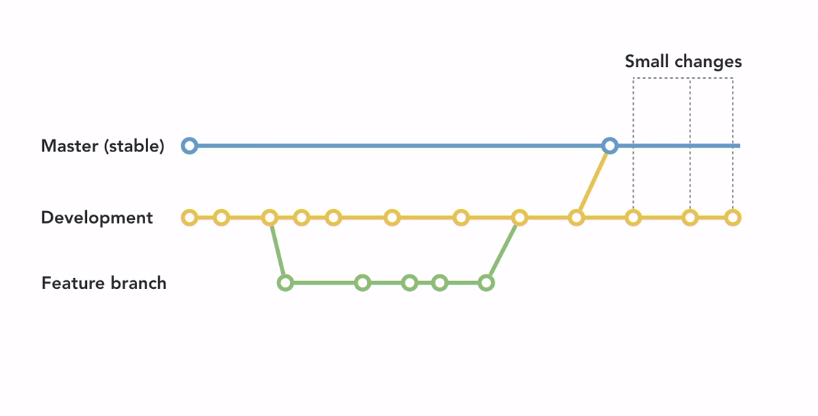
Using Version control
- Git is the most common type of version control.
- Github
- Let’s you create both public and private code bases, called repositories or repos, to work from
An example theme development workflow with Git
Testing the site
- All the test should be done on the staging site.
- Check on different speed tools like browser stack help to check.
- Test on differnet operating system
- Test on different browser.
- Test on different screen sizes and devices.
- Do live user testing and there be a place where live user submit issues with your site.
- Information to collect
- What page the user was on
- What they tried to do
- What they expected to do
- What happened
- Device information – device, operating system, browser
- Information to collect
Taking the site live
- Three ways to go live
- Single click staging to live if the host offer the service.
- Reroute the url
- Using WP Migrate DB
- How to test
- Click on every menu item
- Read every page
- Make sure all images and other media load
- Follow every link and test the site against all available devices
Wrapping up
- Workflow recap
- Define the roles and responsibilities to make the entire development process go more smoothly
- Set up local, dev, and staging environments to properly test new features and content.
- Put in a plan to publish and sync content to those environments.
- Implement version control for your code to maintain the integrity of your code.
- Test for bugs and issues with the user experience.
- Take the site live.
Advanced Build tools and Workflows
What are advanced tools and workflows?
- React.js code
- Advanced Topics
- Grunt and other build tools
- Automated testing
- React and Gutenberg
- Static site generators
Grunt, Gulp, and other build tools
- What are Task Runners?
- Two types of Runners
- Installers
- Dependencies
- Sass
- Linters
- JS libraries
- Tasks
- Minifying source
- Organizing files
- Compiling
- Verifying syntax
- Installers
- node js
- Grunt and Gulp, Read about these.
- Two types of Runners
Automated Testing
- Testing code without human intervention
- Why use Automated Testing?
- Test your code without pushing it to the server
- Prevents unkown bugs and crashes.
- Finds bigger issues before users
- Tests that your code works with the rest of the project.
- Unit Tests (Easy to understand, start with it)
- Test a specific component of code to make sure it works on its own.
- Example: a single function to add two numbers.
- For WordPress check out PHPUnit
- Test a specific component of code to make sure it works on its own.
- Integration Tests
- Scripts that are written to check for a specific chain of events.
- Example: Our added numbers are properly passed to a shopping cart.
- Scripts that are written to check for a specific chain of events.
- UI Regression Testing
- Simulates user interactions on a website to make sure the UI or major components of the website do not break.
- Example: When the Add to Cart button is clicked, an item is added to the cart and the total updated
- Ghost inspector is the good tool for UI regression testing.
- Simulates user interactions on a website to make sure the UI or major components of the website do not break.
A note on Gutenberg and React
- Learn Native React for Gutenberg Block editor and customize it.
- React.js Prereqs
- HTML
- CSS
- JS
- Specifically ES6
- Node.js/npm
Static Site Generators
- Cons of CMS-Driven Sites
- Can be slow
- Feature bloated
- Can’t rely on caching in certain situations.
- Have become complex.
- Static Site Generator or SSG
- Convert CMS-driven sites into HTML, CSS, and Javascript only.
- Pros
- Generally faster
- More Secure
- Version control for content
- Cons
- Not great for interactive sites
- Doesn’t support always changing content well.
- SSG our there
- Jekyll
- Gatsby (popular)
- VuePress
- Should you try an SSG?
- Yes if
- You want to improve performance and security on a site that doesn’t change often.
- No if
- You have a highly interactive site, like a forum or ecommerce shop.
- Yes if
Conclusions
More courses
- Check out WordPress Themes: Customizing Themes with Genesis course.
- Check out WordPress Building Child Themes
- Course on Migrating WordPres with WP Migrate DB and DB Pro
- Course: Mapping the Modern Web Design Process
- WordPress: Building Progressive themes with WP Rig
- Github for Web Designers
- Git Essential Training: The Basics
- Test Automation Foundations.
- React.js Essential Training
- React for Web Designers (A specific part where you find how to create a Gutenberg block)