WordPress: Building Child Themes
Introduction
Level up to WordPress developer
- Child themes modify an existing theme or parent theme
What you need to know
- You know about wordpress as basic.
Using the exercise files
- Just copy the wp-content of the zip file to change with the file provided.
Building on a Solid Foundation
Set up a local development environment
Set up a code editor
- atom (recommended)
- sublime text
- coda
Use real content
- Search for THEME TEST DATA WP TTD github on search.
Creating a Child Theme
What is a child theme?
- Child themes let you control every aspect of your site’s look and feel.
- Child theme modify an existing theme (called the parent theme)
- Child theme works same as like CSS.
- If file 1 says “All text should be red” and file 2 says “All headers on the contact page should be blue”. The both runs separately. Same happen to the child theme.
- How child theme loads files
- Let’s understand with Child themes and CSS
- Load parent theme’s style.css file.
- Load child theme’s style.css file.
- As child theme’s css is loading later so the changes will still show up.
- Child themes and templates
- Load template files from child theme (if they exist).
- Load template files from parent theme ( if they haven’t already loaded the child theme’s template).
- Child themes and Functions.
- Load child theme’s fuctions.php
- Load parent theme’s functions.php
- In wordPress world themes usually modify the content in the database in some small way before presenting that content.
- Let’s understand with Child themes and CSS
Picking a parent theme
- Go for “Wide block” there are less theme in that section.
Creating and activating a child theme
- Have to create a new folder inside themese folder with the name of the theme your are creating, it doesn’t matter what would be the name.
- Place a style.css file inside that folder which looks like the following
/*
Theme Name:   Twenty Fifteen Child
Theme URI:    http://example.com/twenty-fifteen-child/
Description:  Twenty Fifteen Child Theme
Author:       John Doe
Author URI:   http://example.com
Template:     twentytwenty
Version:      1.0.0
License:      GNU General Public License v2 or later
License URI:  http://www.gnu.org/licenses/gpl-2.0.html
Tags:         light, dark, two-columns, right-sidebar, responsive-layout, accessibility-ready
Text Domain:  twentyfifteenchild
*/- The important part is the Template it should be the same to that of the parent theme. In my case it would be ‘twentytwenty’
Including stylesheets
- You will notice that the site seems broken.
- Create a functions.php file inside the child theme folder.
- Add the following code
<?php
add_action( 'wp_enqueue_scripts', 'my_theme_enqueue_styles' );
function my_theme_enqueue_styles() {
	wp_enqueue_style( 'parent-style', get_template_directory_uri() . '/style.css' );
}- Also add your own stylesheet
<?php
add_action( 'wp_enqueue_scripts', 'my_theme_enqueue_styles' );
function my_theme_enqueue_styles() {
	wp_enqueue_style( 'parent-style', get_template_directory_uri() . '/style.css' );
    wp_enqueue_style( 'child-style', get_stylesheet_directory_uri().'/style.css');
}
Best practices for includding stylesheets
- Force the wordpress to load the parent theme’s CSS file first.
<?php
add_action( 'wp_enqueue_scripts', 'my_theme_enqueue_styles' );
function my_theme_enqueue_styles() {
	wp_enqueue_style( 'parent-style', get_template_directory_uri() . '/style.css' );
    wp_enqueue_style( 'child-style', get_stylesheet_directory_uri().'/style.css', array('parent-style'), wp_get_theme()->get('Version') );//The parent-style must load first this line to work.
}- array(‘parent-style’)
- these are the array of files that must load first to include the child-theme line to run.
- wp_get_theme()-<get(‘Version’)
- It is used to resolve the caching issue.
- If we change the version of style.css inside the child theme. And the caching in the server is activated then style.css loads the fresh copy before loading the page.
- Make the code cleaner also
<?php
add_action( 'wp_enqueue_scripts', 'my_theme_enqueue_styles' );
function my_theme_enqueue_styles() {
	wp_enqueue_style( 'parent-style', get_template_directory_uri() . '/style.css' );
    wp_enqueue_style( 'child-style',
      get_stylesheet_directory_uri().'/style.css',
      array('parent-style'),
      wp_get_theme()->get('Version')
    );//The parent-style must load first this line to work.
}
Child Themes and CSS
Employing the laziness principle
- Be lazy
- Only write code when necessary
- Find existing code and tweak it
- Laziness principle make things lot simpler
Designing in the browser
- I know this feature very well. The inspect tool. Even the console.
Modify existing styles
- Changing things in customizer.
- Or make changes inside the style.css file inside the child theme folder.
Add new styles
Challenge: Add flair
Simple CSS challenges. Dude I’ve CSSed my whole blog. chill.
Solution: Add flair
He try to put things here. Go to see this video. it’s good .
Working with Function Files
Understanding functions.php
- Use developer.wordpress.org for all the functiosn to know.
- Functions.php file used for two distinctive purposes
- it is used to set up the features of the theme.
- You will find here the featured image sizes, html 5 support, POST formats, and configuration of custom menus.
- You will find all the stylesheets and js files that are being en queued.
- Also used to hold custom functions.
- it is used to set up the features of the theme.
- How the functions.php file is loaded.
- Child theme functions file is loaded first than Parent theme functions file.
- Because this way wordpress can take advantage of pluggable functions.
- A parent theme has a series of so called pluggable functions that allow the child theme to override them.
- A pluggable function acutally means that it’s wrapped in a conditional statement that checks if the function already exists.
- You can create a function with the same name in your child theme and it’ll prevent the parent theme functions file from running.
- Child theme functions file is loaded first than Parent theme functions file.
Find the functions in the parent
- Find using visual studio “search in the folder”
- Search for “Older posts” in twenty nineteen theme. And you will find that this is a pluggable function.
- Note the “if (! function_exists()):” statement
if ( ! function_exists( 'twentynineteen_the_posts_navigation' ) ) :
	/**
	 * Documentation for function.
	 */
	function twentynineteen_the_posts_navigation() {
		the_posts_pagination(
			array(
				'mid_size'  => 2,
				'prev_text' => sprintf(
					'%s <span class="nav-prev-text">%s</span>',
					twentynineteen_get_icon_svg( 'chevron_left', 22 ),
					__( 'Newer posts', 'twentynineteen' )
				),
				'next_text' => sprintf(
					'<span class="nav-next-text">%s</span> %s',
					__( 'Older posts', 'twentynineteen' ),
					twentynineteen_get_icon_svg( 'chevron_right', 22 )
				),
			)
		);
	}
endif;
Modify a pluggable function
- We can use the twentynineteen_the_post_navigations function in the child theme’s functions.php/
- For special characters use the site “https://dev.w3.org/html/html-author/charref“.
Hooks, Filters, and action
- Hooks
- A place in WordPress code that invites other functions to add to it.
- Hooked fucntion
- A custom PHP function that we can “hook into” WordPress, at the locations specified by the hooks.
- There are two types: actions and filters.
- Filters: Modify existing output
- Actions: Add custom functionality
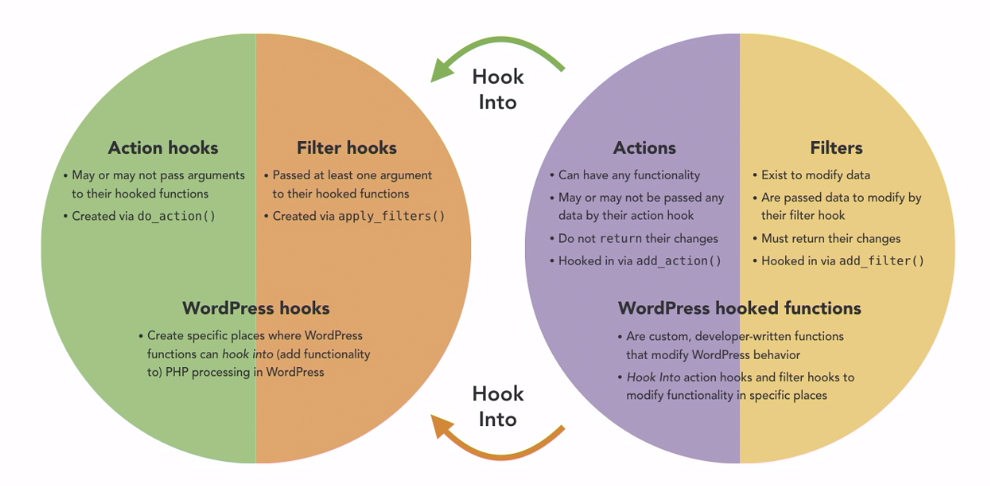
- add_filter has four parameters
- tag
- which is what we’re filtering
- callback
- the name of the function that we want to modify that tag
- priority
- When this function runs.
- In most cases, you can keep this 10 or PHP assumes it 10 if left blank.
- accepted args
- how many arguments you’re passing in.
- Sometimes you have to pass in extra information, and then you want to change this number.
- tag
- add_acton has same parameters as that of add_filter
- tag
- callback
- priority
- accepted arguments
Filter a function
- I’ve added the following code on the DikshantMehta.com child theme’s functions.php
function blog_titles ($title, $id=null) {
	if ( in_category( 'blogs', $id)) {
		$title = "Blogs:".$title;
	}
	return $title;
}
add_filter('the_title', 'blog_titles', 10, 2);
Hooking Function
- opposite to add_action is remove_action to remove the function that you no longer needed. like the widget area in the footer.
- You must call remove action after you added the action.
- to remove the twentynineteen_widgets_init you have to add the following code into your child theme’s functions.php
function remove_parent_functionality() {
  remove_action( 'widgets_init', 'twentynineteen_widgets_init');
}
add_action('after_setup_theme','remove_parent_functionality');
Challenge: Change posted by
- Remove the author name and link. As we can see it is a pluggable function. so add comments on the child functions.php file.
//do nothing since we only have one author and don't want to display anything
//this function is plugging a function in the parent theme so it must remail emply
	function twentynineteen_posted_by() {
    //do nothing

	}
Working with Template Files
Template hierarchy in WordPress
- common wordpress template files
- index.php
- front-page.php
- the front page template is always used as the site front page if it exists, regardless of what settings on Admin>Settings>Reading
- see themplate files hierarchy

- “Show Current Template” plugin
- You can see different templates you used.
Changing an existing template
- Adding image next to authoer bio.
- to do so
- First search “author-bio”
- the copy the author-bio.php in the same location in the custom-theme folder as theat of the parent theme. So that would be /template-parts/post/authoer-bio.php.
- Now add the get_avatar function to add the picture of the author’s avatar.
if ( (bool) get_the_author_meta( 'description' ) ) :
	?>
<div class="author-bio">
	<h2 class="author-title">
		<span class="author-heading">
			<?php
			printf(
				/* translators: %s: Post author. */
				__( 'Published by %s', 'twentynineteen' ),
				esc_html( get_the_author() )
			);
			echo get_avatar( get_the_author_meta( 'ID'), 26)
			?>
		</span>
	</h2>
	<p class="author-description">
		<?php the_author_meta( 'description' ); ?>
		<a class="author-link" href="<?php echo esc_url( get_author_posts_url( get_the_author_meta( 'ID' ) ) ); ?>" rel="author">
			<?php _e( 'View more posts', 'twentynineteen' ); ?>
		</a>
	</p><!-- .author-description -->
</div><!-- .author-bio -->
	<?php
endif;- get_avatar( get_the_author_met( ‘ID’), 26);
- 26 describes the size of the picture.
- add the fllowing code to style the avatar inside style.css inside child theme folder.
.author-bio .author-heading .avatar {
    display: inline-block;
    height: auto;
    width: auto;
}
Add new template files
- In hierarchy category.php is on left to that of archive.php.
- So we can add new template files category.php or category-$categoryname.php.
- let’s add this inside the folder of child theme. I’ve copied the archive.php and change it to category-blogs.php (for dikshantmehta.com) and do things with it. naughty
- You can also integrate advanced custom posts to each blog like the blog reading time, or the video associated to it, and use CSS and php to show that data with individual post type.
Managing backward compatibility
- Write custom functions before template is better approach according to the course-creator.
- One disadvantage of using temlate
- Upstream changes have to be manually applied. That means when the theme updated, then we we have manually change the themes in the child theme.
- Managing Templates
- Many clients keep the same website for 5+ years
- Write codes that requires little to no maintenance. Using CSS to write the function is the best way.
- Oftentimes, you have to modify at least a few templates.
- Try to make changes with CSS and PHP first. If not then move to templates.
- Many clients keep the same website for 5+ years
- Be diligent with theme updates.
Challenge: Custom 404 page
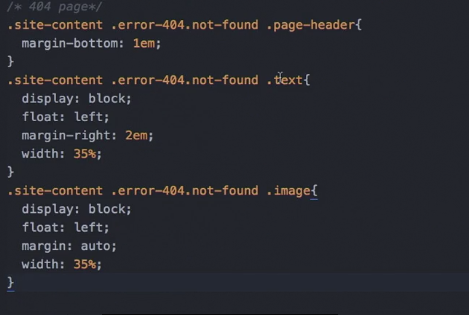
- Copy the 404.php file in the child theme and edit it. Add the image in the same folder as that of 404.php.
- following are the images.
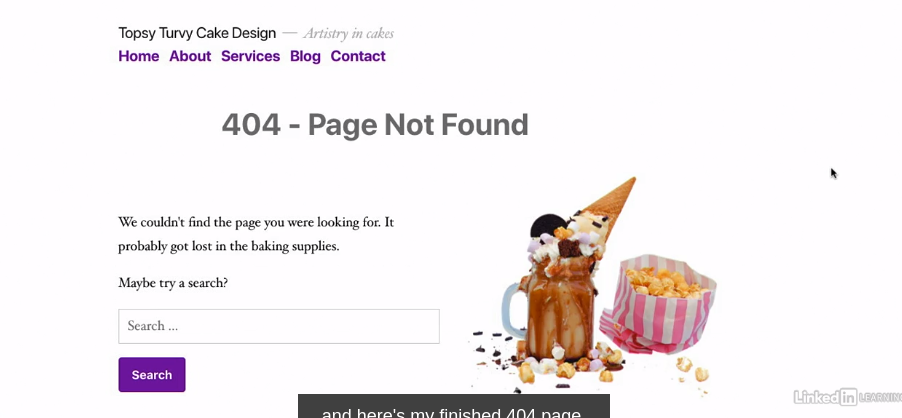

Added the image by the name 404-sweets.png
follwing is the cs
Add New Functionality
Finding existing functionality
- Find the menu in the functions.php file
- existing functionalities like menus and sidebars exists in functions.php
Add a menu
First step is adding a new menu
- Copy the register_nav_menus function from parent functions.php to child’s functions.php.
- copy this functions inside remove_parent_functionality function because it is firing at the right time after the theme setup.
- We can change the name of the function remove_parent_fucntionality to twentynineteen_child_theme_setup
- Don’t forget to change the function name inside add_action
- Remove the ‘footer’ and ‘social’.
- rename ‘menu-1’ to ‘menu-2’ and change ‘Primary’ to ‘Secondary’
- Now you go to customize you can see a new menu inside menus that says “Secondary”
Now we have to display that menu on the desired location.
- Inside parent-theme/template-parts/header/site-branding.php
Change menu output with properties
Style new menu with CSS
Challenge: Conditional widgetized.
Wrapping up
Conclusion
MORE COURSE
- WordPress: Advanced Custom Fields