Sales Navigator Essential
Introduction to Sales Navigator
Follow the following to bost your professional brand:
- Update your linkedin profile giving 30 minutes every month or quarter.
- Regularly create or reshare posts
- Add collegues, and always add a personalized note when sending a connectio request.
- Join a Linkedin Group and join it.
- Create events or newsletter.
Part1: Target
- Account and Lead lists that I saved allow me to research and prioritize using the insigts across the top:
- For lead lists this includes: Job changes, recent Linkedin Activity, shared connection and more.
- For Account lists this includes: senior leadership changes, recent funding events and more.
- Learn more about building custom lists
Part 2: Understand
- Take 15 minutes every day to review yoru Alerts and Highlights from the Homepage
- Using Spotlight as a search filter
- Changed jobs in the last 90 days
- You can prioritize these people based on the assumption that they may be interested in doing things differently and evaluating product/services to help their vision in their new role.
- Mentioned in the news in last 30 days.
- This can give you a unique perspective on a person’s values and opinions, while allowing you to show you have done your research.
- Posted on Linkedin in 30 days
- This can assist you in deciding who prioritize with LinkedIn outreach.
- Following your company
- This gives you confidence that they are already familiar with what your company can do.
- Have shared experience with you
- humanize your approach by uncovering prospects who attended the same schools, worked at the same companies, or belong to the same LinkedIn Groups as you.
- With Teamlink intro
- prioritize people based on existing connections they have with your colleagues.
- Changed jobs in the last 90 days
Part 3: Engage
- The key to thoughtfully engaging with your leads and current customers is using conversation starters from the insights in your research.
- Three ways to message
- InMail
- Prospecting non-connections
- Connection Request
- building relationships
- Direct message
- engaging with your network
- InMail
- InMail Overview
- InMail’s are 3x more likely to be accepted than a cold call, and 6x more likely than email.
- Rules
- Drop the name of shared connection person name while writing InMail to see that if that catch any attention.
- Identify recent Linkedin activity for potential ice breakers in your message.
- InMail Best practices
- Craft a compelling subject line.
- The best InMail messages leave a reader with a sense of Curiosity.
- Also try to generate FOMO.
- Examples
- Christine Wong’s [insert name of senior Leader @ customer] thoughts on AI’s impact to manufacturing [insert topic from recent LinkedIn post or news article]
- Haven’t been back to Laurier [insert name of your shared education experience] in ages!
- My biggest learning from MBA [insert education/certification] or conference/podcast/post or other shared experience
- I agree with you on the importance of flexible work [insert personal hook to something in their recent LinkedIn post or from their profile]
- Personalize the message using relevant insights
- Identify recent Linkedin activity for potential ice breakers in your message.
- Examples
- New roles. Congratulations on your new role! I know that VP’s such as yourself are typically focused on XYZ priorities. We’ve recently helped a few other companies in your field tackle similar challenges.
- In the News. Your recent thoughts in last week’s Forbes interview regarding XYZ initiatives are fascinating! I especially appreciated your strategy to combat XYZ challenges. Did you know that we have helped companies in your industry with some of the same obstacles?
- shared Experience. I noticed we are both part of the same industry group on LinkedIn called HR for Everyone. As a fellow HR fanatic, I appreciate your passion for putting the right talent in the right roles regardless of location.
- Data shows that prospects are 65% more likely to accept an InMail if they switched jobs in the past 90 days. Reaching out to a new hire is a great way to start a conversation and build a new relationship.
- Keep your message short
- Generally 150 words works best.
- Examples
- I’d love to find 10 minutes to walk you through how we can help achieve that goal for MNOP Company. How does this coming Wednesday look for a 10-minute call? I’m available from 1:00-4:00pm CST.
- I see you are based in London, so would 3pm on Thursday for a 15-minute call work? I’ve also linked a flowchart for you to take a sneak peek at the process if you’re curious before we chat.
- I’d love to connect for a 15-minute call to talk through how we’ve worked with similar companies to solve XYZ initiatives. How does next Tuesday at 10:00am EST look for you?
- Provide a clear call to action.
- Have a strong profile.
- Craft a compelling subject line.
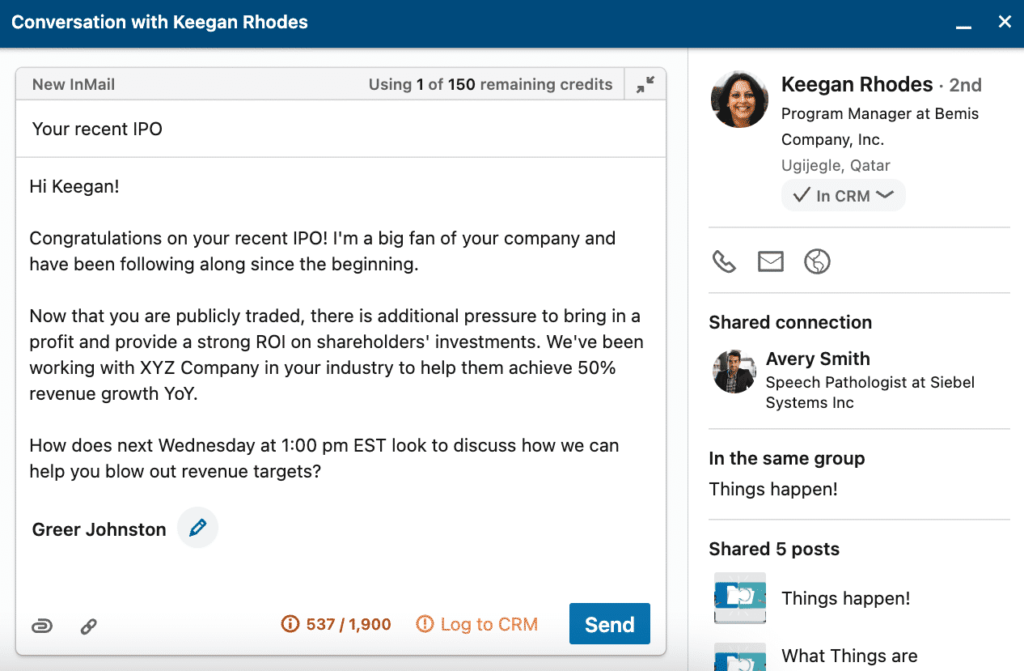
One more example.
Subject: Your recent post about time hacking
Hi Lindsey,
I saw your post about how frustrating switching between tools to get your work done. I’ve had this exact experience it was costing me at least 8 hours each month copying and pasting.
I’d be happy to share more about how, on top of finding some efficiency, I was able to bring it to my team and reduce some costs too.
I see you are based in New York, so would 3pm on Thursday for a 15-minute call work? I’ve also linked a flowchart for you to take a sneak peek at the process if you’re curious before we chat.
Best regards,
Helena Grainger
Sales Navigator in your Workflow
To prospect and generating new business.
- Target
- Save the leads and accounts that you are targeting to custom named lists. This will help you stay organized and efficient with your prospecting. Additionally, it enables real-time alerts to help you prioritize your day and personalize your approach.
- Continue running and refining new searches to identify new prospects. Save those searches to reduce the time you spend finding new prospects by having Sales Navigator automatically notify you.
- Understand
- Review the alerts on your homepage daily to stay current on news about your accounts and identify conversation starters with your leads. Your Homepage should be your de facto account and lead research engine as it saves you time by aggregating the most important news and insights in one place.
- When preparing for prospect meetings or outreach, do your research on the lead and account pages from Sales Navigator to enrich your approach.
- Engage
- Use InMail to compliment your other forms of prospect outreach (i.e. phone and email). Set yourself a goal of one InMail per day. Start by sending them to leads appearing in your Homepage alerts feed.
- Once you have a meeting with a prospect, connect with them on LinkedIn to formalize your professional relationship. This will allow you to message them directly without using InMail and build your credibility by sharing relevant content.
Nurturing and Growing Existing business
- Target
- Save your lead searches to be notified of new customer contacts as they join your accounts. This can help you easily identify people for expansion opportunities.
- Save all your active customers to a Lead List. This will give you a single view of all your active customers while allowing you to keep notes on key details and next steps. Additionally, it enables real-time alerts that help you stay on top of the latest company news and customer activity.
- Understand
- Review the alerts on your Homepage daily to stay current on customer news and identify relationship building opportunities. Your Homepage should be your de facto customer research engine as it saves you time by aggregating the most important news and insights in one place.
- When preparing for meetings or outreach, do your research on the lead and account pages from Sales Navigator to enrich your approach.
- Engage
- Connect with your customers on LinkedIn to formalize your professional relationship. This will also open another way for you to reach each other with messaging that does not require the use of InMail.
- Filter your news feed for new decision makers and securing introductions to new relevant decision makers in accounts using existing contacts, TeamLink, or InMail.
A Day in the life of a LinkedIn Sales Navigator User[INFOGRAPHIC]
Other links and course
- How to build your professional brand on Linkedin
- Find and Prioritize Prospects with Sales Navigator 45 minute live webinar
- Engage with your Buyers through Alerts
- FAQs on Alerts and Spotlight filters
- Get Responses with Inmail
- Use Community posts to know the structure of the best InMail message
- [Live Webinar] Go deeper into advanced search and alerts. Find and prioritie prospects
- Community Insights: Finding Prospects with Advanced Search
- [LIVE WEBINAR] Nurture and Grow Existing Business
What’s next
- https://www.linkedin.com/business/sales/blog/prospecting/data-on-sending-inmails-higher-acceptance-rates
- 10 ways to optimize linkedin profile.
- Get responoses with InMail
- Advanced Sales Navigator Tips